Groups
Groups
Organise, assign and release
Use student groups to manage collaborative assignments, deliver targeted content, or view by class.
Functionally uses:
- Group Assignments: One member submits on behalf of the group; all members can view the submission, grades, and feedback.
- Group Release Conditions: Restrict access to specific content or assessments based on group membership.
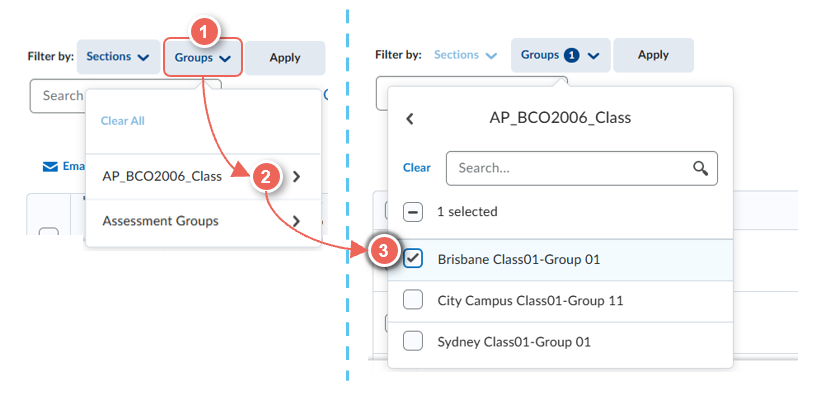
- Filter by class: View attendance, submissions, analytics, and more by class group.
Group creation:
- Create groups: Assign students manually or allow self-enrolment.
- Allocate Plus (AP) Class groups: Automatically created and updated daily from Allocate+ timetable selections. These groups, identified by the AP_ prefix (e.g., AP_ABC1234_Class), must not be manually edited to avoid sync errors and are not suitable for group assessment submissions.
To find out more, see the related guides.
Related guides
- Create Assessment Groups
- Create an Assessment Dropbox
- Marking Group Assessments
- Using Release Conditions
New look filter available Friday 28-Feb 2026.
To filter by Class or Assessment group, select Groups (1) > Group Category (2) > Class Group (3) i.e. Brisbane Class01-Group 01